PY
Pydro
2016-03-18 01:24 UTC
#1
I guess I could do actual work at my job during this time.......
http://www.nooooooooooooooo.com/
So we're expecting it to back up on Sunday, right?
Ha!  Let's hope not.
Looking forward to seeing what we get out of it. Hopefully we don't lose anything… 
See you all in an hour!
Hmmm.
I'm still here. Did I wonder into the void by mistake?
It's all in your head. You didn't actually make that post.
It's all just an imagination of your figment...

Or something like that.
Don't worry citizens! I have sacrificed much of my magics to buy us another hour.

The message is gone...
Nothing seems to have changed.
Am I missing something?

And so began the second ARG on the Greater Than Games Forums:
"What was That All About?"
I think we were all rebooted.
I'm two inches taller now.
We can only hope!
You must have been to space!
Or space has been to me.
Mods have great power.
But no responsibility.
Nope.
That was a harrowing experience!
The website was just down, and is now back up. Who noticed?
I was lost and confused.
I totally noticed, I was refreshing so many times!
Announcement posted, just for kicks.
https://greaterthangames.com/forum/topic/new-servers-8734
And yes, I still exist.
Nope. You only think you do.
And I'm seeing something weird with the edit and reply buttons, it looks like the blue buttons are now all on the extreme right, all under the regular quote one.
https://www.dropbox.com/s/nosc6d3mh6sif0a/Screenshot%202016-03-21%2015.02.21.png?dl=0
I was about to comment the same
I see something a bit different. PM me and I'll take a look this evening. It doesn't seem to be impacting the ability to post to the forum.
Definitely something weird going on. As Mod, I should see Edit and a few other buttons. Looks like all but "Split" are piled up under "Quote". (Plus the "Quote" didn't display correctly?)
And I can't see your attachment there Rabit, it leads to a 404 error.
Hmm... It's loading for me. Can anyone else see it? (I'm at work, so I have to attached it right now.)
I get a not found page as well
I was going to PM it to Joel, but PMs don't allow attachements, so… I'll have to wait until I get home. 
Interestingly, tried the site on my phone. Have the same issue with the buttons and I'm able to download the image (so the image issue might be something related to the user?)...
I see the problem with the attachment and I'm working on fixing it now. Soon it wil be back to normal. :)
I can't log in on my work computer. It says there were too many failed login attempts from it. And that's odd because it was off for the last two days.
Same for me, and from my phone. Still logged in on my iPad but haven't tried to actually log in from it yet.
Interesting… Was curious, so I logged out on my phone and tried to log in. I got the error message Donner and pwatson1974 described.
I've sent a message to Joel about this. We'll see what comes of it.
Add me too the list of people who can’t log in on their home computer. My phone works fine, but my first attempt to log in from home (after a weekend on vacation) was blocked for “too many incorrect logins.” I tried having it send me a new password in case that was the problem, but that errorred to.
I get the "can't login in because of too many attempts, so now you're blocked" error too when I try to login from my laptop. I'm posting this on my iPad, where I must have still been logged in because it didn't ask me to do that before I could post this message.
The login issues are fixed for now. It took me a while to sort out what was wrong and how I might fix it.
This has taken up my time for the night, so I will need to look at the buttons tomorrow. We upgraded some bits when we moved to the new environment, so I think that's that's affected the buttons.
Thanks for your patience.
I was able to login from my home computer tonight.
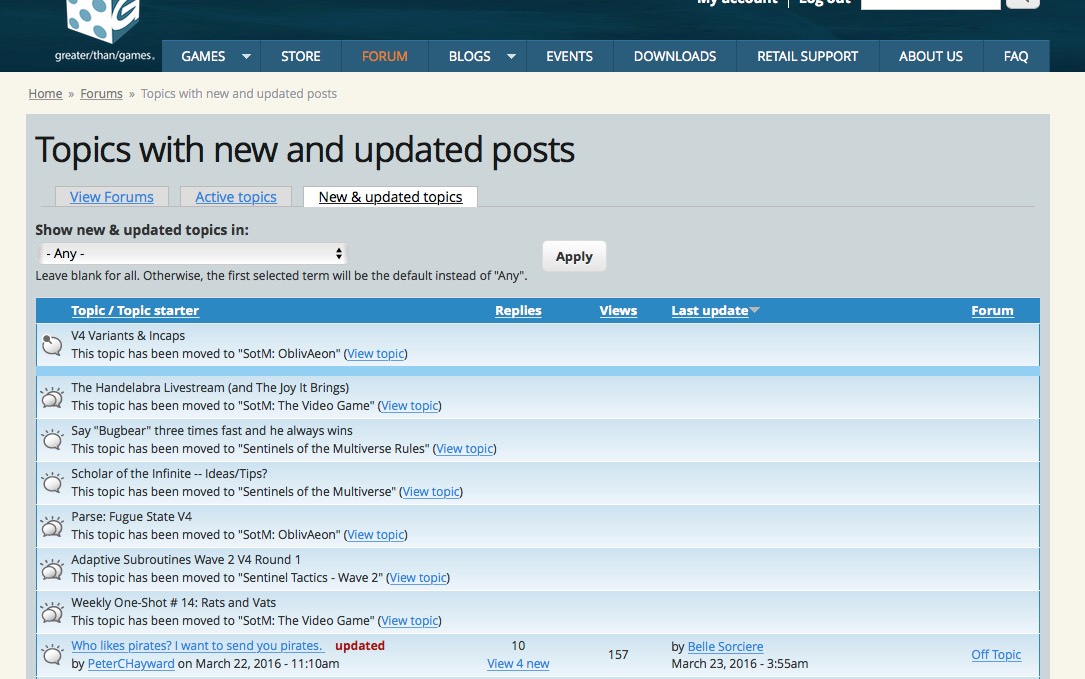
I'm still seeing lots of topics in the "new and updated" which say they've been moved to one section of the forums or another rather than actually showing how many new/updated posts there are (some of the items in the "new and updated" list do show the number of new posts, but others don't). The last time I saw that, the problem persisted for a couple of months. Here's hoping that doesn't happen this time too. :)
Yay! I can log in again!
Thanks for fixing the problem so quickly, and hope you get a good night's rest!
Same here.
You're welcome! The QUOTE button seems to be behaving, too. For the most part. Still working on it…
Yeah, I can see all the buttons, again, but the Quote button is odd looking.
I'll second that.
Thirded. And the first post in the thread doesn't have a Quote button.
Here's what the "new and updated" page looks like to me (attached). As I said the last time this happened, there's no way I'm going to go into each and every topic that says it's been moved just to try to figure out what the actual new posts are, so the forums are effectively broken for me right now.
Uh oh Spiff, there was a playtesting thread in that image. Now people will know we are talking about things.
But yeah, it is really hard to navigate new threads right now.
Ever since that issue appeared I've just used the Active Topics tab which works just as well.
Spiff,
I'm aware of this one and I didn't have a chance to look at it last night. I was tracking down login problems and SSL encryption issues. :) I'm hoping to tackle this tonight. I know I've seen it, but I don't know how I fixed it last time.
Thanks.
Given that you have to open a thread to have it count as "read" anyway, I just open everything and look at the dates.
It's still really annoying not going direct to the new post, though.
The issue looks fixed. Thanks, Joel!
Is anybody else seeing the BBCode source instead of the result? I have a lot of [url] and [quote] showing up in the threads.
Yeah, it looks like the quotes aren't working unless they are nested inside other quotes.
Here's an example page.
https://greaterthangames.com/forum/topic/is-oblivaeon-the-crisis-of-sentinels-and-tactics-is-the-reboot-8515?page=1
EDIT: Argggggg! I just noticed my signature too, why did no one tell me I was walking around with my code showing earlier?
The quote button still looks peculiar to me.
Me too. It's got the word "quote" in it, with the icon to the left of two overlapping pages, but there's a second icon up in the top-left of the blue box that surrounds it all. And that blue box seems to be larger than it should be.
Forth.
My problem to.