TH
theDissilent
2020-04-26 20:08 UTC
#1
It looks like teekismcgeekis hasn't updated the Roll20 character sheet in well over a year, and since it has some missing functionality, I decided to make my own.
I just spent the past 2 weeks teaching myself html, and updating the sheet. I owe Teekis a thanks for the original sheet. I started with his and kept making changes until I had this:

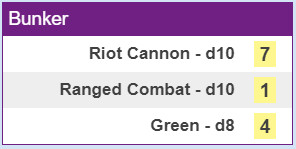
and the Macro results look like:

I'll be using it with my game group this week, and plan to offer it to Roll20 for public use after they've tested it for bugs.
Does anyone have any visible alterations they think I should make first?
GO
Godai
2020-04-26 20:49 UTC
#2
Looks great, and I look forward to seeing how it plays!
RI
rickjonzz
2020-04-27 14:04 UTC
#3
Agreed! Can't wait for it to go public.
GO
Godai
2020-04-27 14:38 UTC
#4
Oh, I remembered one thing that I wish was on the official sheet, that you could consider here. At the end of each entry, a small spot to put Sourcebook and Page number, in case you ever need to be reminded "what the heck was this supposed to do?" Especially useful if you rename Principles, or use the Secret 3rd Option, and pull abilities from other archetypes. It's also a form of future-proofing, for when there are more than one book to choose from.
Examples:
"Principle of Awesome (SC:CRB, p162)"
"Super Mega Attack (SC:CRB, p114)"
TH
theDissilent
2020-04-27 15:31 UTC
#5
I'm thinking it would clutter the character sheet too much.
How would you feel about an extra tab that lists the name of each ability, and has a source input? A little extra work for those that want to use that feature, but I think it's worth it not to overload the main sheet.
or perhaps a button somewhere on the page that hides/unhides an extra line after each ability.
"sourcebook" "page number" "original name"
OR
Orbiwes
2020-05-05 07:58 UTC
#6
How do I get to use this sheet? my players would love it.
TH
theDissilent
2020-05-05 14:20 UTC
#7
I just submitted it to Roll20 yesterday, and am waiting to hear if it's been approved to get added to their site. I'll post here when it's official.
RA
Rabit
2020-05-05 16:11 UTC
#8
Shiny -- looking forward to hearing! :-D
OR
Orbiwes
2020-05-07 05:33 UTC
#9
Great to hear.
Look forward to being able to use it, thanks for all the work put in.
TH
theDissilent
2020-05-12 14:55 UTC
#10
IT'S LIVE!
It got approved by Roll20, and has replaced the previous version as the Roll20 sheet for SCRPG.
RA
Rabit
2020-05-12 15:34 UTC
#12
There really is something comical about having a SCRPG game on Roll20...
We'll never roll a d20.
X-D
ME
Melkhor
2020-05-12 20:26 UTC
#13
The new sheet looks amazing, and it fixed some functionality issues with the old one, but it seems to be missing one important feature. On the old version of the sheet, you could record all your bonuses and penalties, and apply them to your rolls as needed. That function seems to have vanished entirely now. Is it possible that this function can be restored?
TH
theDissilent
2020-05-13 06:29 UTC
#14
Possible yes, but I was asked to remove it by one of the people helping to design the system.
He explained to me that Bonuses, Penalties, and Defense are not tracked on the character sheet, but out on the table for all to see. In the game we've been playing, we have tokens that we drag out onto the table, and place next to a character token that has that bonus/penalty. My understanding is that more acurately represents the intended game play.
If this is something the comunity wants, I can put it back in, but I tend to defer to the game designers.
ME
Melkhor
2020-05-13 08:31 UTC
#15
Well, I can only speak for myself, but my players are *extremely* unhappy about having lost the function :(
ME
Melkhor
2020-05-13 08:36 UTC
#16
Especially since the automatic replacement of the sheet on Roll20 deleted all of their stored bonuses and penalties from last session too.
TH
theDissilent
2020-05-13 14:25 UTC
#17
Shouldn't those go away at the end of the scene? I guess you might have had to end a session mid scene.
Hmm. Well, it would be rather simple for someone with a pro account to recover the data from your player's character sheets. Much more so then re-incorporating the feature. Invite me to your game over PM, and I can do that for you pretty quickly.
P2
Powerhound_2000
2020-05-13 17:09 UTC
#19
What's the link to your fiilable character sheet on roll20?
TH
theDissilent
2020-05-13 17:43 UTC
#20
When you create a game on Roll20, it gives you options of which character sheet to use.
https://app.roll20.net/campaigns/new
Select “Sentinel Comics RPG” and you are set to go.
RI
rickjonzz
2020-05-14 01:54 UTC
#21
My players really liked the new sheet. Thank you!
RL
Rogue_Lich
2020-05-15 15:57 UTC
#22
I'm actually starting to put together a Roll20 SCRPG game today. So if I click the (only) Sentinel comics sheet available there, it will be this one, yeah?
I'm a big Roll20 noob. I'm watching a few tutorial videos, but they're all D&D-centric.
Does your sheet roll the dice? The basic dice rolling stuff on Roll20 doesn't seem to work for this game, which is disappointing.
TH
theDissilent
2020-05-15 16:26 UTC
#23
Correct. The old one was made before the starter kit, so it was really out of date. Roll20 just replaced it with this new one.
Now there's a thought. I might know some people who'd be interested in making a Roll20 tutorial based on SCRPG.
It does! There are checkboxes next to each Power/Quality/Status that select them as the active dice, and a button at the top of the page that rolls all 3 to look like:
You can determine Min/Mid/Max from there.
RL
Rogue_Lich
2020-05-15 17:09 UTC
#24
You are wonderful. Thanks!
I will send you my first born child. What is the address?
RL
Rogue_Lich
2020-05-15 19:32 UTC
#25
I just made a character and it is working well. I was a little concerned that there was no "save" button, but I guess Roll20 just saves it as you create. The dice rolling is good. I like the lock/unlock button that reveals page numbers where the info sources are. That's a nice touch.
Next I will create a supervillain.
Learning Roll2o and setting up my campaign continues...
DR
drevilz4l
2020-05-20 16:27 UTC
#26
Used this last Friday for our game. It works great. I'd love some functionality for Minions and Lieutenants. Not sure exactly how that would work, It'd be nice to create them ahead of time and just drag them to the board with stats and powers built in.
TH
theDissilent
2020-05-20 20:19 UTC
#27
I didn’t create tabs for Lieutenant or Minions since there is such little information needed for each, I didn’t think they needed a character sheet. I can add a tab next to Villain if people want me to.
In the meantime, there are suggestions on how to use Roll20 to GM effectively on another forum thread: https://greaterthangames.com/forum/topic/using-roll20-for-scrpg-21718#comment-205756
HI
HIbikiSayo
2020-05-20 20:48 UTC
#28
BTW!!! Great update!!! Been s=using the old one for a few months now Glad someone was able to take up the mantle and get a new sheet out!!!!
I'll be playing with my group tonight and will let you know who they think it works.
JP
jpmarcotte
2020-06-10 23:44 UTC
#29
One thing I'm noticing is that the field names for hit points makes it difficult to use a Hit Point Bar accurately. Based on what I'm seeing, there should be a maximum value that is named the same as the current value with `_max` appended. (Currently those character sheet values are `currenthp` and `greenmax`) So if they were changed to `hp` and `hp_max` that should automatically link the current and max values together so that it could autogenerate a health bar on a character token. I'm still relatively new to GMing and using character sheets on Roll20, though, so might be wrong about this.
TH
theDissilent
2020-06-15 20:17 UTC
#30
Nice Catch. I tested it out, and you're right.
The sheet also has "hp" representing Hero Points, so I set the 2 attributes to "health" and "health_max".
I've got it working on my end, so now is the arduous process of convincing Roll20 to accept the changes. Hopefully, we'll see it updated soon.
TH
theDissilent
2020-06-28 02:55 UTC
#31
The Good News is that the sheet is updated, and you can now set a health bar by assigning the Attribute of "health".
The Bad News, is that all the sheets got reset to the default Value of 17. If you need the old numbers, they are still in the character sheet, just not displayed. Check the Attributes & Abilitiies tab, and scroll down until you see "greenmax" and "currenthp".
SH
shadowopal
2020-07-02 07:02 UTC
#32
Took the wife through character creation the other night and just wanted to say thanks for all the work you put into this. It made things very easy for us and this is my wife's first exposure to Rpg's. She said the sheet is fantastic and I couldn't agree more.
AC
aclarkbr90
2021-01-31 20:42 UTC
#33
Hi Dissilent,
I've been running some games via Roll20 using your character sheet and we are really loving it! Thanks so much for creating this! I don't know if you are continuing to work on it, but I thought I would add some comments here:
- It would be really cool if you could link your abilities into the chat so that everybody could see them. So when you use "Flying Smash" the full text of the ability goes straight into the chat. I frequently ask players to read out the text of their abilities or the twists from their principles, and it would be much easier if they could just automatically link those things. Plus, that means everybody would get to see the cool names that stuff has.
- As a GM, I'd love an environment tab. The villain one works ok for this purpose, but its less good at keeping track of environmental twists.
- Sometimes twists cause die sizes to get downgraded. It would be cool if there was a way to do that while not forgetting the original die size
- Some abilities let you roll a single die (or sometimes you want to reroll a single die due to a mis-selected pool or something). It would be cool if there was a way to do this.
- The character sheet currently doesn't have a way to keep track of bonuses and penalties. That would be really helpful. And as with abilities in general, it would be cool if you could link the bonus or penalty into chat when you use it.
- The minion tab is helpful for keeping track of how your minions work, but it doesn't actually let you add the minions you currently have. That would be a cool setup, both for players than use minions as well as for the GM's minions. I'm thinking like an option to indicate die size (which would roll straight into chat when clicked) as well as name and abilty (if applicable). That way, "Khopesh Slash: This minion gets +1 to attack rolls" feels a lot more like a Khopesh Slash than just a +1 bonus.
All of these things can be managed through roll20 already, but they would be great improvements to the sheet.
TH
theDissilent
2021-02-12 15:40 UTC
#34
Yup, I'm still here. I had been refreshing this page less and less over the past year. The current forum only e-mails me when I get a private message. Hopefully the new one will allow us to "follow" a thread.
- I love your idea for having Ability Name and Description show up. I'll play around with that.
- Environment Tab should be easy enough.
- Single Die rolls, I had been just using the same Macro, and ignoring the other 2 dice, but I'll give that another think.
- As for the things that only happen during 1 encounter (Bonuses, Penalties, Defence, & even Minions), I mentioned earlier that the game intends for those to be kept track of on the table, not on the character sheet. If you are using house rules that allow you to keep these things from one session to the next, then there are plenty of places to keep Notes.
I suggest you check this forum for suggestions on organizing the play area: https://forum.greaterthangames.com/forum/topic/using-roll20-for-scrpg-21718
PA
patransom
2021-02-19 23:57 UTC
#35
Dissilent,
This character sheet is great!
I also would love to see a way to post Ability Name and Description into the chat. Either in conjunction with a die roll or just as a separate button.
I've been using custom attributes and a macro to deal with environments, but an Environment Tab would still be a nice add.
For minions, I just store the current die size in Bar 1 and then set up a macro to roll using it. I'd be happy to post it here (or maybe more appropriately in the other thread) if anyone's interested.
TH
theDissilent
2021-02-23 03:29 UTC
#36
There are 4 new features:
* Environment Tab
* Single Die rolling buttons
* Print buttons to send stats, tables, and abilities to the chat
* A 'Basic Actions' sub-tab on the abilities tab (Mostly so there is a place to print the tables from)
I also updated the default page numbers to match the current version of the book, but that's not really a feature.
PA
patransom
2021-02-24 06:18 UTC
#37
These additions are awesome!
We were playing on Roll20 tonight and I said to one of my players, "I think the person who made this character sheet is planning to add buttons so you can post your ability text to the chat, but for now, please remind me how [whatever ability the player was using] works..."
Then, a few minutes later, another of the players rolled a single power die and I said "How did you do that?"
Then we all started looking at the new buttons on the character sheet and that first player said "What does this button next to [that same ability I asked the player to explain earlier] do?"
Then we realized that these additions were already done (and awesome, thanks!)
GO
Goochman
2021-04-24 17:49 UTC
#38
I’m looking for the character sheets anywhere online that I can fill on my computer but I can’t find them. Please any help would be appreciated.
Thanks in advanced.
G
Welcome to the Forums, @Goochman!
There are form-fillable character sheets available on Greater Than Games’ web-page. Go to Games and find the Sentinel Comics Roleplaying Game Core Rulebook’s page. Scroll down and you’ll see four fillable files that can be downloaded for free:
I hope this helps!
GO
Goochman
2021-04-24 18:42 UTC (in reply to #39)
#40
TH
theDissilent
2021-12-06 21:40 UTC
#41
Hey everyone who’s using my Roll20 implementation of the character sheet. I wanted to let you know that I just updated the sheet with a couple new features. I had noticed that I never made the sheet compatible with Archetype #19: Divided, so I decided to remedy that.
At the bottom of the Forms/Modes tab, there is now a “Divided Options” section, and it has 3 parts:
- Selecting either of the Forms adds a Toggle to the top of the Abilities Tab to switch between them. This toggle is an arrow that points to the Form you are in, as well as controlling the other 2 features.
- There is space to fill in dice for 2 separate Personalities. (If you decide to stick with one, just fill them identically)
- There is a checkbox for Divided characters that roll 2 Powers in one form and 2 Qualities in the other.
That last part doesn’t combine well with the other Forms/Modes options. If someone decides to play a Divided Form-Changer (Why?), or finds another way to use both options, contact me. I’m sure we’ll be able to find a way to make the sheet work for you.
Muerto’s Archetype is Divided: Form-Changer.
TH
theDissilent
2021-12-07 01:14 UTC (in reply to #42)
#43
LOL. I missed that. Luckily, he doesn’t use the Divided option to use 2 Qualities in Ghost mode & 2 Powers in Technology form, so it’s not going to be a problem putting his character into the sheet.
He also doesn’t use the Divided option to have 2 personalities, so he doesn’t need my new features at all.
TH
theDissilent
2022-01-11 21:05 UTC
#44
My aesthetic changes just got merged into Roll20. I’m attempting to make the sheet look even more authentic to the art of the Core book. The biggest change is the Roll Template now shows the dice in the chat, surrounded by the color of your current status.
Enjoy!
SE
Sea-Envy
2022-01-13 07:59 UTC
#45
cool, Omnicron has my group back on Roll20
SE
Sea-Envy
2022-02-20 01:02 UTC
#46
are there still any plans to make a “character sheet” or “clip board” tracker for minions and lieutenants? my next arc has a group of distinct lieutenants and while I was able to make a villain sheet for the team with each team member as a power and rolling one die that is a bit clunky
TH
theDissilent
2022-02-20 17:08 UTC (in reply to #46)
#47
I had at one point offered to make a tab to keep track of Minions & LTs, but no-one responded, so I dropped it. I’ve got some free time now though, so I’ll put some work in.
SE
Sea-Envy
2022-02-20 20:51 UTC
#48
thank you. you are great for spending your time to help the community
TH
theDissilent
2022-02-21 19:45 UTC
#49
I have coded it, and it is ready to submit to be merged into roll20. I’d test it with my group first, but since we have access to API scripts, I doubt we will use it. If you have a Roll20 Pro account, I just posted my minion method in Using roll20 for SCRPG - #20 by theDissilent which is a thread for general advice on using Roll20 for SCRPG.
TH
theDissilent
2022-02-22 18:25 UTC
#50
The Changes are live.
There are 2 new tabs. One for Minions & Lieutenants, and one for general note taking.
To make room, I combined Minion-Maker options with Form-Changer options under Auxiliary.
Like I said, my group didn’t playtest this, so if something goes wrong, or you want more added, let me know.
SE
Sea-Envy
2022-02-23 10:28 UTC
#51
only thing I noticed tooling around for 5 minutes was the sound effect for the die roll booping twice.
TH
theDissilent
2022-02-24 17:46 UTC
#52
I am unable to reproduce that error, so it’s not universal. If it continues to be an issue for anyone, we should try to figure out when it happens, and when it doesn’t.
SE
Sea-Envy
2022-02-26 06:25 UTC
#53
one other thing, I don’t know code or Roll20 so it might take too long but… you have four cells for filling in dice to make squads could you make it five? Minions often come in groups of [H] and 5 is a common value for [H]
and the double sound effect did not happen today my computer might have been weird earlier
TH
theDissilent
2022-02-27 18:28 UTC (in reply to #53)
#54
I’ve seen [H] range from 2 to 6. There’s always going to be a bigger group. I figured a squad of 8 was a good number to assume 2 rows would represent. That’s why I made the details collapsible. Collapse one row, and keep the other open, so it visually looks like one squad.
Honestly, 4 is the most I can fit on one line of the roll template without having to redo to image sizes, and that’s the number I want to stick with.
SE
Sea-Envy
2022-02-27 21:43 UTC
#55
cool, I figured it would either be a quick fix or not worth the time.
I can always group my five as 2 and 3
DA
darkstar1484
2022-03-26 06:30 UTC (in reply to #14)
#56
I will admit my players and I just started and got a bit frustrated too with the lack of ability to track bonuses and penalties. Biggest reason being that roll20 doesn’t have a great method to allow us to pass around cards or other tokens for bonuses and penalties. I may have to design something myself for it and while I can I would admittedly much rather have it on the sheet as the play medium doesn’t allow for the notecard thing.
Edit: I should mention though that other than that the sheet is honestly quite good. I want to make sure that that’s clear as well.
GO
Goochman
2022-03-26 07:05 UTC
#57
So let me get this straight, D20 has the sheets and stuff to help with the RPG?
SE
Sea-Envy
2022-03-26 10:08 UTC (in reply to #57)
#58
online browser virtual tabletop
SE
Sea-Envy
2022-03-26 10:10 UTC (in reply to #57)
#59
SCRPG (kcdrez.github.io)
is another online game manager someone made
there is also a discord bot that can do SCRPG dice rolls
TH
theDissilent
2022-07-31 14:09 UTC
#60
Apparently Greater than Games put out an official Roll20 character sheet 5 months ago, and I just now noticed it in the Roll20 repository.
I couldn’t find any announcement or forum thread. Does anybody have any helpful info on the subject?